Mobile Speed Trap: The iPhone Settings That Turn Your Car Into a £1,000 Fine Magnet
Your iPhone is plotting against your driving licence. Not intentionally, but through a maze of features, settings, and interactions that UK traffic law treats as serious offences — even when you think you're being hands-free and responsible.
The brutal reality? Most British drivers have fundamentally misunderstood what's legal behind the wheel. And modern iPhones, with their helpful notifications, voice responses, and seamless connectivity, are turning routine journeys into expensive legal minefields.
The £1,000 Misconception: What Hands-Free Actually Means
Here's what most UK drivers believe: as long as you're not physically holding your phone, you're legally safe. This dangerous myth is costing motorists their licences.
Under the Road Traffic Act 1988 and subsequent updates, "using" a mobile device extends far beyond physical contact. The law targets distraction, not just hand position. And your iPhone's most convenient features often create exactly the kind of distraction that triggers Fixed Penalty Notices.
The current penalties:
- £200 fine and 6 penalty points for standard mobile use
- Up to £1,000 fine and licence disqualification for serious cases
- Automatic licence loss for new drivers (first two years)
Siri: Your Expensive Voice Assistant
Siri feels safe because it's voice-activated. But UK courts increasingly treat voice interactions as "using" your device, especially when they require attention or responses.
Legal grey areas with Siri:
- Reading messages aloud: While Siri can announce incoming texts, your verbal response to "reply" or "call back" constitutes device interaction
- Navigation requests: Asking Siri to "find the nearest petrol station" requires you to process visual map information
- App launching: "Open Spotify" might seem hands-free, but selecting songs or playlists involves continued interaction
Safer Siri configuration: Disable "Announce Messages" in Settings > Notifications > Announce Messages. Configure "Do Not Disturb While Driving" to activate automatically, blocking most Siri temptations entirely.
CarPlay: The Authorised Trap
CarPlay creates a false sense of security because it's manufacturer-approved and dashboard-integrated. But legal approval doesn't equal unlimited use.
CarPlay interactions that can trigger fines:
- Text message management: Reading or composing messages through CarPlay still constitutes "using" your phone under UK law
- App switching: Navigating between CarPlay apps requires visual attention that courts consider dangerous distraction
- Music browsing: Scrolling through playlists or selecting specific tracks involves the kind of decision-making that traffic law aims to prevent
The legal reality: CarPlay is treated similarly to built-in infotainment systems. Brief, essential interactions might be acceptable, but extended use can still result in prosecution.
Notification Nightmares: When Your Lock Screen Becomes Evidence
Even locked iPhones can create legal problems through notification previews. If traffic police observe you glancing at your device to read notification previews, that visual interaction constitutes "use" under current interpretations.
High-risk notification scenarios:
- Banking alerts: Checking account balances or fraud warnings
- Work emails: Reading message previews during commute hours
- Social media: Instagram, WhatsApp, or Facebook preview glances
- News alerts: BBC or Sky News breaking news notifications
 Photo: Sky News, via e0.365dm.com
Bulletproof notification settings: Navigate to Settings > Notifications > Show Previews and select "When Unlocked." This prevents any readable content appearing on your lock screen, eliminating the temptation to glance at your device.
For driving periods, enable "Do Not Disturb While Driving" which can automatically detect vehicle movement and block all notifications until you've stopped.
The Mounting Trap: Legal Positioning vs Illegal Interaction
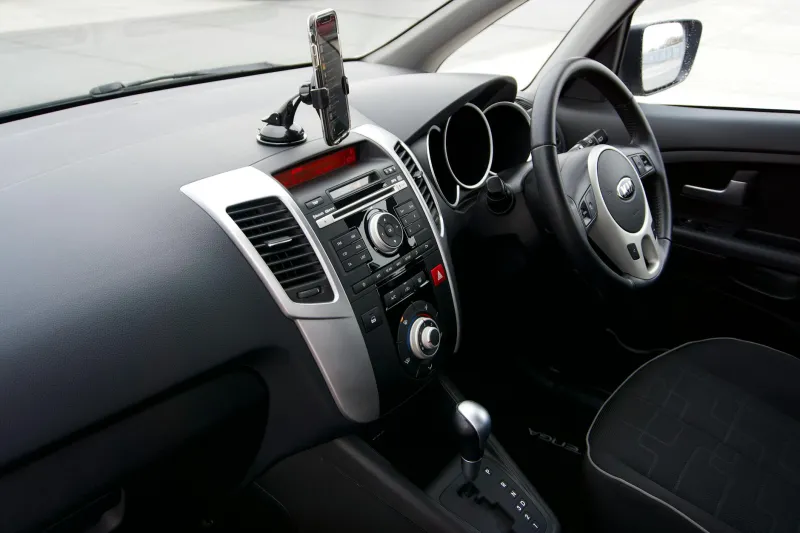
Phone mounts create another misconception. While properly mounting your iPhone is legal and recommended, the mount doesn't grant immunity from interaction laws.
Legal mounting requirements:
- Secure attachment that doesn't obstruct windscreen view
- Easy reach without stretching or leaning
- Stable positioning that doesn't vibrate or move
Illegal interactions despite proper mounting:
- Touching the screen to dismiss notifications
- Adjusting navigation mid-journey
- Answering calls by tapping the screen
- Taking photos or videos while driving
The 2-second rule: UK traffic law increasingly applies a "2-second glance" guideline. Any device interaction requiring more than 2 seconds of visual attention can be prosecuted as dangerous driving.
Emergency Exceptions: When Law Becomes Life-or-Death
UK law recognises genuine emergencies, but the definition is narrower than most drivers assume.
Legally acceptable emergency use:
- Calling 999 for immediate danger to life
- Contacting emergency services for serious road accidents
- Reporting dangerous drivers or road hazards
NOT considered emergencies:
- Work calls marked "urgent"
- Family situations requiring immediate response
- Breaking news or stock market alerts
- Navigation during unexpected road closures
The Insurance Trap: How Mobile Fines Multiply Your Costs
Mobile phone convictions don't just mean fines and points. They trigger insurance consequences that can cost thousands:
- Premium increases: 6 points typically raise insurance costs by 25-50%
- Policy cancellation: Some insurers automatically cancel policies after mobile convictions
- Future coverage: Mobile convictions must be declared for 5 years, affecting every insurance renewal
- Company car implications: Employer vehicle policies often have zero tolerance for mobile convictions
Bulletproofing Your iPhone for UK Roads
Here's your complete legal protection checklist:
Essential settings changes:
- Enable "Do Not Disturb While Driving" in Settings > Focus
- Disable lock screen notifications in Settings > Notifications
- Turn off Siri suggestions in Settings > Siri & Search
- Disable automatic app launching for navigation apps
- Configure CarPlay to show only essential apps
Physical preparation:
- Mount your iPhone before starting your journey
- Set navigation destination while stationary
- Configure music playlists in advance
- Inform contacts about your driving schedule to reduce incoming calls
Emergency protocols:
- Use voice-activated emergency calling only for genuine 999 situations
- Pull over safely before any non-emergency device interaction
- Keep a hands-free kit properly configured and tested
The Future of Mobile Driving Law
UK legislation is evolving rapidly as smartphone capabilities expand. The Department for Transport is consulting on stricter regulations that could make any device interaction while driving illegal, regardless of hands-free status.
 Photo: Department for Transport, via c8.alamy.com
Proposed changes include:
- Complete prohibition on device interaction while engines are running
- Automatic detection systems that can identify mobile use from roadside cameras
- Increased penalties for repeat offenders
- Company liability for employee mobile use in company vehicles
The safest approach is treating your iPhone as completely off-limits while driving. The convenience of staying connected isn't worth the financial and legal consequences of modern mobile offences.
Your iPhone should enhance your journey, not endanger your licence. But that requires understanding exactly where UK law draws its increasingly strict lines — and configuring your device to respect those boundaries automatically.