Departure Lounge Daylight Robbery: The Truth About Airport SIM Kiosks and Your Locked iPhone
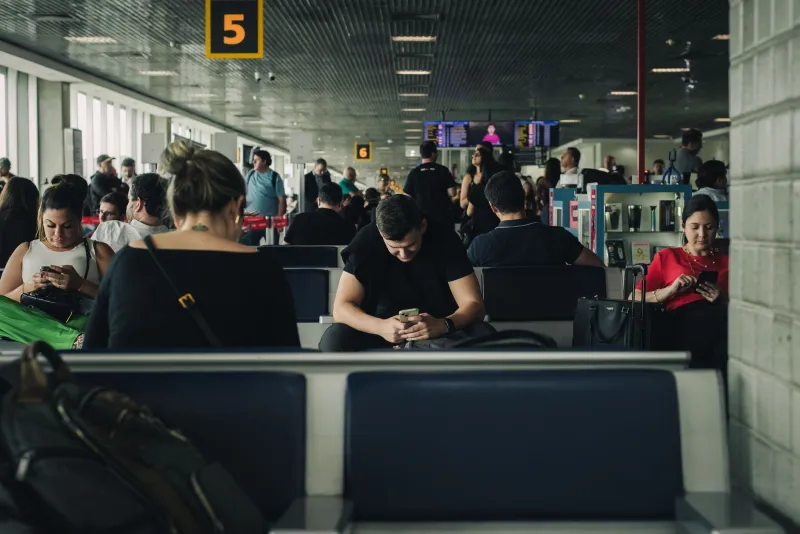
You've checked in, survived security, and you're standing in the departure lounge at Heathrow with forty minutes to spare. Then you spot it — a bright, cheerful kiosk promising "Stay connected anywhere in the world" with a travel SIM for just £39.99. The sales assistant is friendly, the packaging looks professional, and your flight is boarding in half an hour. What could go wrong?
Quite a lot, as it turns out. Particularly if your iPhone is still locked to your home network.
The Kiosk Business Model Relies on Your Panic
Airport retail is a peculiar beast. Everything costs more in a departure lounge — your pint of Guinness, your bottle of water, your Toblerone. Travel SIM kiosks operate on exactly the same principle: catch people at their most stressed, time-pressured, and distracted, and sell them something they haven't properly researched.
The SIMs themselves aren't necessarily fraudulent. Many are perfectly functional products. The problem is that the kiosk staff are trained to sell, not to diagnose. They will ask you where you're travelling. They will recommend a package. They will process your payment efficiently. What they are very unlikely to do is ask whether your iPhone is network unlocked — because if they did, a significant chunk of their customer base would have to walk away empty-handed.
Industry estimates suggest that somewhere between 20% and 30% of iPhones currently in circulation in the UK remain locked to their original network. That's millions of handsets. And their owners are wandering through airport departure lounges every single day.
What "Locked" Actually Means at 30,000 Feet
A network-locked iPhone will only accept SIM cards from its carrier — or carriers within the same group. If your phone is locked to EE and you insert a travel SIM from a different provider, your phone will either display "SIM Not Supported" or simply show no signal at all.
This doesn't damage the phone. It doesn't affect your data or photos. But it does mean that £40 SIM card is completely, entirely useless in your specific device. You could buy ten of them and not a single one would work.
The airport kiosk staff member who sold it to you isn't technically lying. The SIM does work — just not in your phone. The distinction is one most stressed travellers don't think to probe.
The Pricing Reality Check
Let's talk numbers, because they're illuminating. A typical airport travel SIM for European destinations costs between £25 and £45 at Heathrow kiosks. For longer-haul destinations like the US, Australia, or Southeast Asia, prices frequently climb past £50.
Meanwhile, an identical data allowance from a major UK network's own roaming add-on — purchased online before departure — typically runs between £5 and £15. International eSIM providers like Airalo or Holafly offer comparable packages for similar prices, purchasable directly on your phone with zero queuing required.
The airport premium is real, and it's substantial. But at least if you're buying a roaming add-on from your existing network, it'll actually work in your locked phone. The airport kiosk SIM won't.
Consumer Complaints: A Pattern Nobody's Addressing
The Citizens Advice Bureau and various consumer forums see a recurring pattern of complaints from travellers who purchased airport SIMs that didn't function in their devices. The resolution process is deeply unsatisfying — airport retail units are often franchises with limited accountability, refund policies vary wildly, and by the time you realise the SIM doesn't work, you're either mid-flight or already abroad.
 Photo: Citizens Advice Bureau, via insightcreative.co.nz
Trading Standards has the theoretical power to investigate misleading sales practices, but airport SIM kiosks occupy a regulatory grey area. The product works as described — just not in every phone. The onus, it seems, falls on the consumer to know their own device's lock status. Which is frankly absurd.
 Photo: Trading Standards, via www.officeforstudents.org.uk
The Pre-Departure Unlock Window: What You Actually Need
Here's the practical reality that every UK traveller should tattoo on their brain before booking a holiday: unlocking your iPhone through your network takes time, and you cannot leave it until the day of travel.
Most major UK networks — EE, O2, Vodafone, Three — process unlock requests within 1 to 5 working days when submitted through official channels. However, some requests can take up to 10 working days, particularly if your account details need verification or if there's any ambiguity about your contract status.
Third-party unlock services (the legitimate ones, not the dodgy "guaranteed in 24 hours" operations on random websites) typically process requests in 2 to 5 working days for most networks, though premium faster services are available.
The rule of thumb: allow a minimum of 7 days before departure. Ideally 10 to 14 days if you want to sleep comfortably. Do not leave it until the week of your flight.
Your Pre-Flight Unlock Checklist
Booking a holiday? Here's what to do the moment those flights are confirmed:
Day of booking: Check your iPhone's lock status. Go to Settings > General > About and look for "Carrier Lock" — if it says anything other than "No SIM restrictions," your phone is locked.
Same day: Contact your network and request an unlock. If your contract has ended and the phone is paid off, they are legally required to unlock it for free. If you're still in contract, you may need to pay a fee or wait until the contract ends.
Can't wait for the network? Use a reputable third-party unlock service and factor in their processing time. Check reviews carefully and avoid any service promising instant unlocks for premium prices.
One week before departure: Test the unlock with a spare SIM from a different network. Don't assume the confirmation email means everything worked — physically test it.
At the airport: If your phone is properly unlocked, you can absolutely buy a local SIM at your destination for a fraction of what the Heathrow kiosk charges. In most European cities, a local SIM with generous data costs under £10.
The eSIM Alternative Nobody's Talking About Loudly Enough
If your iPhone is an XS or newer (which covers the vast majority of handsets currently in use), you have a trump card: eSIM capability. An eSIM is a digital SIM that you activate without any physical card — you download a QR code or tap a link, and a new network profile installs itself onto your phone.
But here's the catch: eSIM still requires your phone to be unlocked. A network-locked iPhone will reject a foreign eSIM just as readily as it rejects a physical SIM from a competing carrier.
Unlock your phone first, and eSIM travel becomes genuinely transformative. You can purchase and activate an international data eSIM from your sofa, days before departure, for a fraction of airport prices. No kiosk required.
The Simple Truth
Those airport SIM kiosks aren't going anywhere — they're too profitable for terminal operators to remove. But they're selling a product that's completely incompatible with a significant portion of the phones their customers are carrying.
The fix is simple, free in most cases, and takes less effort than packing your suitcase. Check your lock status today. If your phone is locked, contact your network or use a trusted unlock service. Give yourself proper lead time before you fly.
Because the only thing worse than paying £40 for a SIM that doesn't work is discovering that fact at the departure gate.